
Alphabet Typing Test Finger Placement Guide
Use this guide to type A to Z with the correct fingers on a standard QWERTY keyboard.
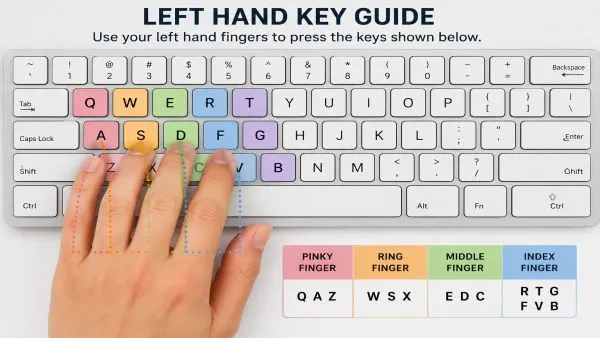
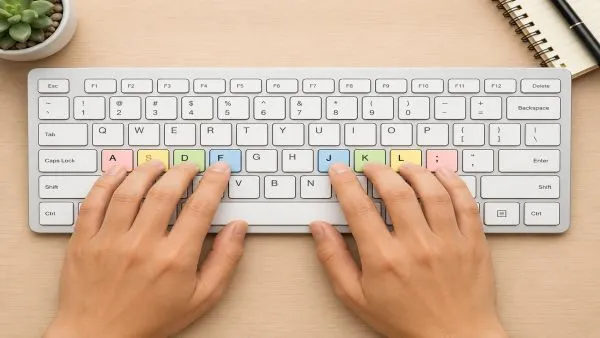
Starting Position: Home Row
Place your fingers on the home row first.
Left Hand
- Pinky finger: A
- Ring finger: S
- Middle finger: D
- Index finger: F
Right Hand
- Index finger: J
- Middle finger: K
- Ring finger: L
- Pinky finger: ;
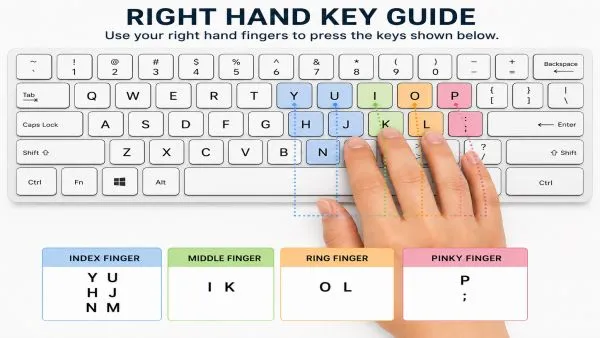
Your thumbs can rest on the spacebar.
A to Z Finger Placement
| Letter | Finger | Hand |
|---|---|---|
| A | Pinky finger | Left hand |
| B | Index finger | Left hand |
| C | Middle finger | Left hand |
| D | Middle finger | Left hand |
| E | Middle finger | Left hand |
| F | Index finger | Left hand |
| G | Index finger | Left hand |
| H | Index finger | Right hand |
| I | Middle finger | Right hand |
| J | Index finger | Right hand |
| K | Middle finger | Right hand |
| L | Ring finger | Right hand |
| M | Index finger | Right hand |
| N | Index finger | Right hand |
| O | Ring finger | Right hand |
| P | Pinky finger | Right hand |
| Q | Pinky finger | Left hand |
| R | Index finger | Left hand |
| S | Ring finger | Left hand |
| T | Index finger | Left hand |
| U | Index finger | Right hand |
| V | Index finger | Left hand |
| W | Ring finger | Left hand |
| X | Ring finger | Left hand |
| Y | Index finger | Right hand |
| Z | Pinky finger | Left hand |
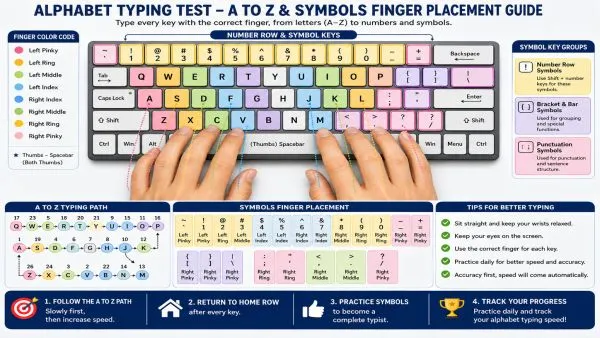
Step-by-Step A to Z Guide
How to Practice Each Key in the Alphabet Typing Test
Press each letter slowly using the correct finger. Return to the home row after every key. Small steps build the muscle memory that makes alphabet typing feel natural and fast.
Step 1: A
Press A with your left pinky finger.
Step 2: B
Press B with your left index finger.
Step 3: C
Press C with your left middle finger.
Step 4: D
Press D with your left middle finger.
Step 5: E
Press E with your left middle finger.
Step 6: F
Press F with your left index finger.
Step 7: G
Press G with your left index finger.
Step 8: H
Press H with your right index finger.
Step 9: I
Press I with your right middle finger.
Step 10: J
Press J with your right index finger.
Step 11: K
Press K with your right middle finger.
Step 12: L
Press L with your right ring finger.
Step 13: M
Press M with your right index finger.
Step 14: N
Press N with your right index finger.
Step 15: O
Press O with your right ring finger.
Step 16: P
Press P with your right pinky finger.
Step 17: Q
Press Q with your left pinky finger.
Step 18: R
Press R with your left index finger.
Step 19: S
Press S with your left ring finger.
Step 20: T
Press T with your left index finger.
Step 21: U
Press U with your right index finger.
Step 22: V
Press V with your left index finger.
Step 23: W
Press W with your left ring finger.
Step 24: X
Press X with your left ring finger.
Step 25: Y
Press Y with your right index finger.
Step 26: Z
Press Z with your left pinky finger.
Practice Line
Practice this slowly first:
A B C D E F G H I J K L M N O P Q R S T U V W X Y Z
The first goal is to press every key with the correct finger. After accuracy improves, speed will become easier.
Type the Alphabet Typing Test
Twenty-six letters. One shot. No second chances. The alphabet typing test sounds deceptively simple — just press A through Z in order — but the moment a timer starts ticking, even experienced typists discover just how much their fingers have a mind of their own.
What Is the Alphabet Typing Test?
Think of it as a stress test for the whole keyboard. Rather than relying on familiar word patterns, the alphabet typing test asks someone to move deliberately across every single key — from A to Z — in one unbroken sequence. With all 26 letters in play, it functions as a genuine speed test for the whole keyboard — exposing blind spots, especially on letters like Q and X that rarely appear in everyday sentences. The real question anyone curious about their keyboard skills should ask is: how fast can you type alphabet from A to Z without a single stumble? The alphabet a-z run reveals what muscle memory actually knows versus what a typist only thinks they know.
How to Play the Alphabet Typing Test
Pull up the platform, hit start, and let the timer run. The only job is to type the alphabet in order — pressing every key in order as quickly and accurately as possible, without breaking the chain. Most versions display the alphabet on screen so there is no guessing about the next key. When Z finally registers, the test spits out a score, a time, and a clear picture of where things went wrong. Beginners often discover that the alphabet backward — should they try that backwards mode — is a completely different challenge, even if the keys are the same.
Why Take the Alphabet Typing Test?
Here is something most people do not consider: a typist can score well on word-based tests while secretly struggling with half the keyboard. Because common sentences lean on the same letters repeatedly, weak keys stay hidden. The alphabet typing test closes that loophole. Every letter on the keyboard gets its moment — no skipping, no shortcuts. For anyone building genuine typing skills rather than test-taking familiarity, this is where honest progress begins.
How Fast Can You Type the Alphabet?
The honest answer is: slower than expected. First attempts tend to land somewhere between 12 and 20 seconds for most people, regardless of how fast they think they type. Consistent practice can push that below 8 seconds, and dedicated typists eventually break 5 seconds. The fastest time to type the alphabet sits under 3.5 seconds in elite circles — a number that requires both blazing reflexes and zero hesitation on every single key. The real measure, though, is not just time to type the alphabet but whether every letter lands correctly along the way.
Alphabet Typing Benchmarks and Records
- Over 20 seconds — First attempt territory; focus on sequence before speed
- 12–20 seconds — Beginner range; letter recognition is still being built
- 8–12 seconds — Intermediate; familiarity growing, a few keys still hesitant
- 5–8 seconds — Advanced; finger placement is solid, reflexes are sharp
- Under 5 seconds — Fast typist level; alphabet from a to z feels almost automatic
- Under 3.5 seconds — Elite record zone; every key responds without conscious thought
Improve Your A to Z Typing Speed
Speed on this test does not come from trying harder — it comes from practicing smarter. Repeating the alphabet sequence slowly and deliberately, focusing on using the correct finger every single time, does more in five minutes a day than hammering through it carelessly for an hour. The goal is to build muscle memory so deep that the hands move without waiting for instructions from the brain. Once that happens, the timer takes care of itself.
ABC Typing and ABCD Typing Tips
For anyone just getting started with ABC typing, the biggest mistake is treating this like a memory exercise. Reciting the alphabet is easy — but reaching every letter on the keyboard in order, correctly and quickly, is a physical skill. An alphabet typer tool that highlights the next key on screen helps bridge that gap early on. Say the letter, press the key, feel where the finger lands. That connection between letter recognition and finger placement is what eventually makes the sequence feel effortless.
Quick Tips for Faster Typing
- Stop looking down — the screen matters more than the keyboard
- Anchor to the home row between letters; drifting hands lose precious fractions of a second
- Breathe — tight shoulders and tense wrists are the enemy of fast, fluid key presses
- Run it with a timer every session; without pressure, practice rarely translates to performance
Tips to Improve Your Typing Speed
Typing speed and accuracy grow together, not separately. Chasing a faster score while ignoring errors just cements bad habits. Structured typing lessons — available on platforms like typing.com — build speed the right way: one row, one hand, one habit at a time. Speed typing drills work best after the foundation is solid. Before worrying about how fast can you type the alphabet, it pays to be sure that typing skills are built on accuracy first.
Typing Basics for Alphabet Practice
The home row is not just a starting position — it is the spine of the whole keyboard. Fingers rest on A, S, D, F and J, K, L, and the semicolon, and every keystroke should begin and end there. Knowing which finger handles which key removes the guesswork from every single letter on the keyboard. The pinky reaches Q; the index finger covers letters like B and N. Once these assignments become second nature, typing the alphabet in order stops feeling like a sprint across unfamiliar ground.
Mastering Touch Typing
Touch typing is not about speed — it is about removing the conscious mind from the loop. A typist who has to think about where each key sits will always be slower than one who just types. Getting there means starting painfully slowly without looking, accepting more errors early on, and trusting that the correct finger for each key will eventually become automatic. The alphabet sequence is the perfect vehicle for this because it covers every key, gives instant feedback, and takes under a minute to complete. Thirty focused repetitions a day, done without looking, quietly builds the kind of skill that no shortcut can replicate.
Finger Exercises for Faster Typing
Typing is a physical activity, and fingers that move well type well. A quick warm-up — spreading all ten fingers wide, holding, then releasing — loosens the joints before a session. Tapping each finger independently on the desk, from pinky to index and back, builds the finger dexterity that separates fluid typists from stiff ones. Running the alphabet sequence at half pace as a warm-up, deliberately placing each finger correctly, primes the hands before any timed attempt.
Typing Game to See How Fast You Type
What keeps people coming back to the alphabet typing test is the same thing that makes any good typing game work: the score is right there, it is honest, and it improves visibly with effort. Players see how fast they type in real time, chase a faster time on the next run, and watch their rank climb as each session builds on the last. It is fast-paced enough to stay engaging but grounded enough to feel like genuine progress — not luck. Whether someone is chasing an elite record or just trying to beat their own score from yesterday, the test has a way of making the next attempt feel entirely within reach.