
PPSC، FPSC، NTS اور دیگر سرکاری آسامیوں کی تیاری کے لیے اردو ٹائپنگ کی مشق کریں — آن اسکرین اردو کی بورڈ کے ساتھ، آپ کو کمپیوٹر میں اردو کی بورڈ انسٹال کرنے کی ضرورت نہیں۔
اپنا نام اور ای میل درج کریں۔ سرٹیفکیٹ خودکار طور پر ڈاؤن لوڈ نہیں ہوگا — ہماری ٹیم آپ کی درخواست چیک کر کے سرٹیفکیٹ آپ کو ای میل کرے گی۔
InIntroduction
Urdu is not just a tongue of the subcontinent; it is the language of Poets, revolutionaries, and scholars, building a universe of charisma. An Urdu typing test measures heritage moving with Accuracy and typing speed. Every single keystroke tells a story. Behind the scenes, Time Elapsed, Keystrokes, and spacebar taps combine into an Error Rate, separating Correct Words from those typed wrongly, misspelled, or simply left incomplete against Total Words.
Long before software existed, the Centre for Research in Urdu Language Processing engineered Phonetic keyboard layout version 1.0 for Microsoft, becoming the default Urdu keyboard layout across every Windows operating system, built on Unicode 5.1. Ethnologue’s 2021 data ranks Urdu the 21st-largest first language, spoken by 61.9 million native speakers, as a second language it reaches 230 million total speakers, the tenth most frequently spoken language across Pakistan and globally. From what I’ve seen, millions use an Urdu typing test as a benchmark for administrative roles, data entry, and journalistic roles, a timed assessment of ability to type a passage of text within set time.
What Is An Urdu Typing Test?
Beginners across Pakistan and India open this website to measure typing speed — a robust assessment blending Urdu typing master ambition with practice makes perfect touch typing, download an official shareable certificate, and genuinely improve accuracy fast.
WPM, Accuracy & Typing Test Terms (GWPM Vs NWPM)
Most typists chase raw Words Per Minute, but real skill lives in Accuracy Percentage. I track Total Correct Characters against Mistakes, since Correcting backspace reshapes the formula. GWPM flatters; Net Words Per Minute humbles typists.
Difference Between Gross Words Per Minute And Net Words Per Minute
Every typing test conceals two figures: gross tallies Total Keystrokes divided by 5 characters per word, whereas net subtracts Mistakes after Correcting via backspace, applying a standardized formula tied to Accuracy Percentage — genuine typing metrics.
How Is WPM & Accuracy Calculated?
Gross Words Per Minute simply counts Total Words Typed, yet Net Words Per Minute matters more, since NWPM penalizes users for wrong words and Incorrect Words, while Accuracy remains a percentage of correct words scored.
What Is Urdu Phonetic V1.1 By CRULP
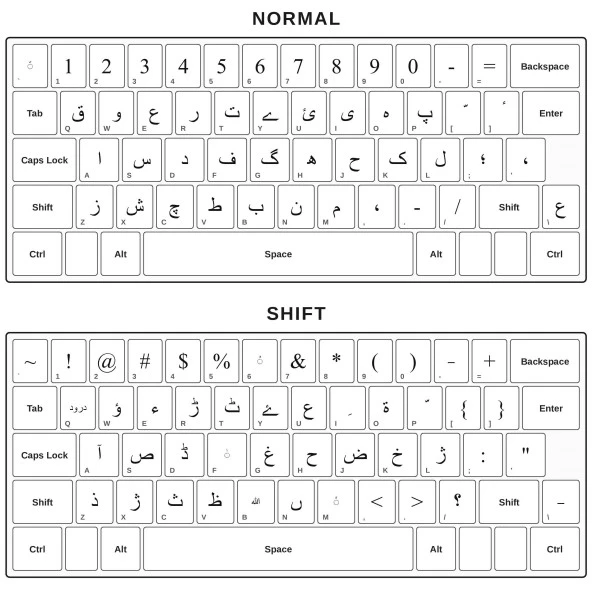
CRULP built Urdu Phonetic v1.1 for the Microsoft platform in April 2004, giving Pakistan its Urdu phonetic keyboard layout: A for Alif, S for Seen, J for Jeem — matching English alphabet sounds to Urdu letters makes it fast typing to learn through character placements.
Built-In Phonetic Mapping
Switching keyboards intimidated me until S produced س and A became ا, needing no separate OS keyboard configuration. My familiar English QWERTY inputs now map onto phonetic Urdu script, staying fully accessible for absolute beginners.
Instant Verifiable Certificate
After my complete typing test session ends, the timer runs down and a modal appears — enter your name, and a high-resolution certificate generated instantly. Download as PNG or PDF, or share on social media.
Why Take An Urdu Typing Test
Many learners start with a free Urdu typing test simply as practice, treating each session as personal development rather than pressure — others need it for school assignments or job applications, sharpening their ability to type.
Job Requirements
Employers hiring for data entry jobs often specify a minimum Urdu typing speed, and passing scores translate into a shareable typing certificate — complete with name, date, and verified Urdu typing credentials — that strengthens professional networks.
Back Space Key Enable & Disable Mode
Toggling backspace off forces typists to type without looking, sharpening muscle memory and accuracy. Enabling it lets users practise freely, correcting mistakes instantly. Typing Test takers advance faster once full speed replaces correction, gaining skills.
Show Incorrect Words
The tool flags every misspelled character as soon as you type it, giving instant visual feedback. Real-time accuracy tracking lets you correct mistakes on the spot, while backspace key helps fix errors without losing speed.
Increase Net Words Per Minute
Net WPM comes from catching mistakes early, type fast without panic, and daily practice building muscle memory. Adjust speed, watch Live WPM and accuracy metrics, keep focus—typing speed grows steadily over an extended period.
About Urdu Language
Urdu unfolds in right-to-left mechanics, its Nastaliq script curving through nuanced ligature formations unlike Latin alphabets. I’ve watched native readers trace strokes instinctively, proof this Jameel Noori Nastaliq font heritage still shapes daily reading rituals.
Nastaliq & Calligraphic Aesthetics
Urdu’s beauty lives in its Nastaliq script, where flowing curves and nuanced ligature formations shape every word. Typing tools built on the Jameel Noori Nastaliq font let native readers enjoy authentic right-to-left mechanics without sacrificing speed or visual elegance.
Visual Keyboard Feedback
Typing in Urdu turns intuitive once fingers memorize the visual phonetic keyboard layout: keyboard buttons mapped through the Phonetic Urdu Keyboard render special characters like ژ and ڑ, helping you type quickly, accurately, boosting WPM.
Continuous Real-time Stats
As you type, the interface tracks speed and higher accuracy live. The interactive virtual keyboard flashes gray for each mapped Urdu character while WPM and Overall Typing Speed update within the set amount of time.
FAQs
How Is WPM (Words Per Minute) Calculated In Urdu?
WPM calculated by dividing total number of correct characters typed by 5, the standard word length, over elapsed time in minutes. For example, 250 correct characters in 1 minute equals 50 WPM, dividing by 5.
Do I need to install an Urdu keyboard on my computer or phone?
No, in most cases you don’t need to install any Urdu keyboard software on your computer or phone — our platform runs on a built-in English-to-Urdu phonetic interceptor, so your standard QWERTY English physical keyboard is all you’ll ever need. Just type the English sounds naturally and the system will automatically map and render the phonetic Urdu characters on screen in real time. That said, if you notice your typing isn’t matching up correctly and the phonetic mapping seems off, it usually means a conflicting language pack is interfering — in that case, go into your device’s keyboard settings, remove the Urdu (Pakistan) language if it’s installed, and then download and install a phonetic keyboard separately. This fixes the issue for the vast majority of users. In rare cases where that still doesn’t resolve it, switching to the Urdu (India) keyboard language instead has worked for a few people I’ve helped troubleshoot this exact problem with, so it’s worth trying as a last resort.
How do I get my official Urdu typing certificate?
Getting your certificate is straightforward once you’ve completed a test — I usually tell people to just pick whichever duration matches how much time they’ve got that day. You can attempt the 1 minute test if you’re short on time and just want a quick score, go for the 3 minutes test for a more balanced read on your speed and accuracy, or take the 5 minutes test if you want a result that genuinely reflects sustained typing performance. Whichever one you choose, the certificate generates instantly after you finish, pulling your live WPM and accuracy stats directly into a downloadable format you can use for job applications or personal records.
What is the 5-minute Urdu typing test?
The 5-minute Urdu typing test is, in my experience, the truest measure of someone’s actual typing ability because it doesn’t let early nerves or a lucky fast start skew the final number. Over five full minutes, your fingers settle into a rhythm, fatigue starts creeping in around the same point it would during real work, and the resulting speed and accuracy score ends up being far more honest than a quick one-minute burst. Most employers and institutions that ask for proof of Urdu typing skill specifically request results from this longer format for exactly that reason.
What Urdu typing speed is required for data entry jobs?
Most data entry roles I’ve come across typically expect somewhere between 25 to 35 words per minute with at least 90% accuracy, though the exact figure really depends on the employer and the nature of the work involved. Government and institutional postings tend to set the bar a bit higher, sometimes asking for 35 words per minute or more, while private sector openings can be more flexible if your accuracy is consistently strong. My advice has always been to focus on accuracy first, since speed naturally builds up once your finger placement and word recognition become second nature.
How should I handle Erab (diacritics) while typing fast?
Handling Erab while typing fast is something a lot of learners overthink, and honestly, from my own time practicing, the simplest approach is to leave diacritics out entirely unless the specific text you’re working with absolutely demands them. Everyday Urdu writing, including most professional and data entry contexts, rarely requires Erab marks, so chasing them during a timed test will only slow you down and hurt your rhythm. If a particular passage does call for diacritics, it’s better to slow your pace slightly and place them deliberately rather than rushing and introducing avoidable errors.
How do I type characters like ‘ژ’ or ‘ڑ’ on the Phonetic keyboard?
Typing characters like these on the Phonetic keyboard is easier than it looks once you know the sound-based logic behind it — I remember being confused by this exact thing when I first started. Rather than hunting for a special key, you simply type the closest English sound combination, and the system recognizes the pattern and converts it into the correct Urdu character automatically. A little bit of trial and error in your first few sessions is normal, but within a day or two of regular practice, your fingers pick up the pattern without you even having to think about it.