
Python Typing Test 1-15 Minutes Online Free
Practice typing real Python code — functions, loops, conditionals and algorithms. Build the speed and accuracy every developer needs, one keystroke at a time.
Enter your name and email below. The certificate is not downloaded automatically — our team will review your request and email your certificate to you.
Introduction
A Python typing test exists because real Python code behaves nothing like plain sentences. Python developers meet colons, indentation, and def statements day to day, so code-specific typing practice builds muscle memory habits from prose.
Typing speed here means little without Accuracy, since WPM only matters when correctly typed characters outnumber mistakes. Beginners often start slow, but developers who practice daily eventually reach realistic 60–80 WPM speeds without sacrificing precision.
Why Practice Typing Python Code Specifically
Ordinary typing tests only measure how fast your fingers move across plain English sentences, but a Python typing test pushes your brain to process indentation, colons, brackets, and keyword-heavy structures while your keystrokes protect accuracy.
Because Python powers web apps, automation scripts, data science, and machine learning, practicing real Python code builds professional value beyond a simple benchmark; typing widely used languages fluently turns everyday practice into a career skill.
Every def, class, import, and return statement carries its own rhythm, and operators break up syntax patterns in ways random words never do; focused code-typing practice slowly turns stumbling into steady improvement, so solving problem.
Tracking live WPM and words per minute across Python snippets shows real improve over time, while tab-based indentation drills build muscle memory that reduces error breakdowns; signup takes seconds, and the right tools help programming.
How To Practice And Improve Your Python Typing Speed
Learning to write code and typing Python accurately rarely arrive together, so I quietly started practicing inside real Python projects. Typos near a misaligned block taught me more than theory, and accuracy came through repetition.
Numbers eventually confirmed what my fingers already knew. Words Per Minute climbed slowly, and developer speeds shifted from clumsy to comfortable. WPM tracking and progress trends mattered less than consistent practice built around familiar patterns.
Working developers admit that speeding up starts with correct habits formed from day one, not talent. Touch typing freed attention for logic, and that shift alone boosted productivity, sharpened confidence, and eased faster code reviews.
Ten to twenty minutes of dedicated practice daily beats scrambled effort; focused practice compounds into realistic working speeds, while CPM and typed characters improve together, letting career growth follow once less time fights the keyboard.
WPM, Accuracy, and How Typing Speed Is Measured
Most tools calculate raw speed by dividing total characters by 5, then time in minutes, turning Characters Per Minute into a familiar 1 WPM figure — though an uncorrected mistake lowers the real percentage that counts.
Switching from C-family languages to Python’s syntax exposes wrong characters fast — punctuation-heavy languages punish missed indentation space, while experienced daily users judge correct output, not real execution error, as the core metrics, near 45–75 WPM.
Code Typing Practice Features
A solid routine starts with structured sessions that build muscle memory slowly. Rather than random drills, categorized exercises group challenges by difficulty, letting a learner move from simple print statements toward loops without feeling overwhelmed.
Because languages punish sloppy fingers differently, syntax-specific challenges matter more than generic drills. Colons, brackets, and indentation each demand rhythm, so practicing common coding patterns trains fingers to anticipate structure before the eyes finish reading.
Mistakes reveal more than raw speed could. Error analysis by character shows where fingers hesitate, whether it’s a stray semicolon or a misplaced parenthesis, turning vague frustration into a concrete, fixable habit rather than mystery.
Since projects rarely stay in one language, switching between multiple languages inside a session keeps reflexes flexible. A performance-tracking layer logs every attempt, so improvement becomes visible across weeks instead of vanishing when tabs close.
Small conveniences add up over time. Editor-style shortcuts speed up navigation, an accuracy percentage keeps ego in check, and special-character drills target underscores, colons, and braces that trip up programmers who type in plain English.
Benefits of Typing Practice for Coders
Confidence at the keyboard changes how code gets written. Practicing leads to fewer typing errors creeping into sound logic, which matters more than it seems the first time a missing colon breaks a function silently.
Clean fingers produce clean output. Developers who train regularly notice better code consistency across every file, since spacing and bracket placement stop depending on mood and start depending on habit built through steady, deliberate repetition.
Teams feel this too. Smoother pair/mob programming sessions happen when nobody stalls mid-sentence hunting for a missing symbol, letting the conversation about logic continue on instead of pausing every few seconds for a fumbled keystroke.
Pressure exposes weak habits fast. Live-coding interviews reward candidates who can express an idea without wrestling visibly with the keyboard, since interviewers read hesitation as uncertainty even when the underlying reasoning is correct and sound.
Over time the friction disappears entirely. What once felt like fighting the keyboard slowly becomes invisible, freeing real attention for architecture and problem-solving instead of the mechanical act of getting characters onto the screen correctly.
Who Should Use a Typing Speed Program
Anyone who genuinely wants to feel comfortable typing while thinking through a problem benefits here, not just beginners. The goal is removing friction so attention stays on logic instead of hunting for the next key.
Loops, conditionals, and everyday functions together form the backbone of most real code, so practicing exactly those shapes repeatedly builds instincts that transfer directly into actual projects rather than staying stuck inside a training tool.
Interview-prep candidates face a particular kind of pressure, needing to write working solutions on a shared screen while someone silently watches. Training beforehand removes one variable, letting preparation focus entirely on algorithms rather than fingers.
New programmers often type slower than they honestly think, which quietly discourages them before skill even becomes the real bottleneck. Deliberate practice separates the mechanical challenge from the conceptual one early, before bad habits calcify.
Even experienced users benefit too, since frequent API calls and dense method names punish clumsy fingers under real pressure. Segments users can revisit narrow drills anytime, sharpening the exact patterns their daily work actually demands.
Programming Languages Available to Practice
Breadth matters because real careers rarely stay inside one syntax. Java, C++, and C# each carry their own bracket-heavy rhythm, while Python and Go lean toward cleaner, sparser lines that train very different finger patterns.
Web-facing work brings its own particular demands. HTML/CSS punctuation differs sharply from JavaScript logic, and the need to switch languages mid-session quietly mirrors a typical afternoon of full-stack development, jumping between markup, styling, and behavior.
Lower-level and specialized paths deserve attention too. Rust and Assembly/Machine Code punish imprecision harshly, while SQL rewards careful clause structure, and plain C and PHP still power enormous amounts of production code developers touch daily.
TypeScript adds structure on top of familiar JavaScript shapes, so practicing it alongside plain C sharpens awareness of syntax differences that otherwise cause subtle, frustrating errors when developers move quickly between static and dynamic styles.
Keeping everything under one profile beats scattering effort across scattered competitor tools, since tracking progress across every language in a single, unified place shows real growth instead of fragmented, hard-to-compare snapshots scattered everywhere online today.
Keyboard/Interface Mechanics
Layout choice shapes everything downstream fairly quickly. QWERTY remains the default for most learners, while Dvorak and Colemak rearrange keyboard layouts around finger comfort, rewarding anyone willing to relearn muscle memory for long-term ergonomic gain.
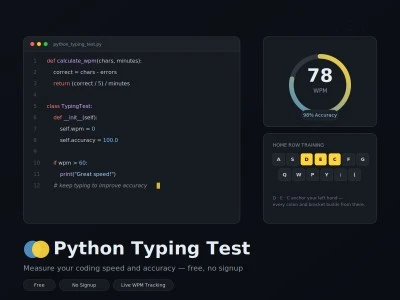
Finger-to-key assignments matter more than people usually assume. The left-hand middle finger typically owns keys like D, E, and C, and reinforcing that mapping consistently prevents the sloppy reaching that slows accuracy under real pressure.
Forced correction mode changes the entire feel of daily practice. Instead of racing past a mistake, a learner must fix it immediately, which builds precision habits that casual typing games quietly let slide by unnoticed.
Small letters carry surprising weight during focused training. Repeated attention to just those 3 keys, D, E, and C, exposes which fingers lag behind, turning a vague sense of clumsiness into a targeted, fixable weakness.
None of this replaces genuine daily practice, but the right keyboard layout paired with deliberate finger assignments compounds quickly, turning awkward early sessions into fluid, almost unconscious typing within a surprisingly short stretch of time.
Real Open-Source Code as Practice Material
Clean textbook examples are tidy for a good reason, but that tidiness rarely matches reality. Practicing on messy, real snippets pulled from actual projects prepares fingers for the inconsistency that production-grade code always eventually contains.
A genuine version-control source file rarely reads like a polished tutorial. Odd spacing, leftover comments, and inconsistent naming show up constantly, and typing through that mess builds tolerance most clean textbook examples never bother teaching.
History matters too. Long before modern workflows existed anywhere, Mercurial repositories held enormous amounts of production code, and pulling typing material from that real history connects drills to how software actually evolved across the decades.
Synthetic snippets, by contrast, often feel suspiciously smooth, missing the small irregularities that trip up real typing. Practicing against actual production code closes that gap, making the transition to daily work feel far less jarring.
Realistically, nobody writes flawless code on the very first pass, so training on true source files rather than sanitized samples builds instincts that hold up under the genuine unpredictability of everyday professional development work itself.
Frequently Asked Questions
What is a Python/coding typing test, and what does it measure?
It measures raw typing speed and accuracy specifically on real Python syntax — indentation, colons, functions, def statements, loops, and conditionals — rather than plain sentences, so results reflect actual coding patterns and the kind of muscle memory benchmarks programmers actually rely on day to day.
How is this different from a normal typing test?
Standard typing tests use natural language, where words flow evenly. Code tests throw in punctuation-heavy syntax, brackets, operators, and function names, which is harder for fingers used to everyday language. An experienced programmer often hits a higher rate on code-typing tests than standard ones, since those patterns repeat frequently in real development work, and the skill genuinely does transfer.
Which languages can I test/practice besides Python?
Beyond Python, supported languages include Java, C, C++, C#, JavaScript, TypeScript, PHP, Rust, Go, SQL, HTML/CSS, and Assembly/Machine Code — all available on the coding typing test hub. Switching between these tools keeps practice from feeling repetitive and mirrors how most real jobs actually work.
How often should I practice, and how fast should I expect to type?
Short, frequent sessions of about 10–20 minutes beat rare marathon ones. Expect roughly 45–75 WPM on general text, with familiar-pattern speeds on Python code often climbing toward 60–80 WPM once the syntax starts feeling automatic.
Does Python’s indentation-based syntax make it harder to type quickly?
At first, yes — precise tab/space handling trips people up, and a misaligned block can trigger an IndentationError that breaks everything. With steady practice, most modern editors offer auto-indent support, and indentation becomes an automatic part of muscle memory rather than a conscious struggle.
Is this good for beginners?
Definitely. For a beginner, learning to type and learning to code are technically separate skills, but practicing them simultaneously builds good typing habits alongside correct syntax from day one, so a code-focused typing routine avoids later-reconciled skills that are harder to fix afterward. New typists can also start with alphabet finger training before moving to code.
Is it free, and do I need to sign up?
Yes — there’s no signup required. Just open the tool in your browser, pick a language, and start typing. WPM and accuracy are calculated automatically, with built-in error tracking so you can see exactly where mistakes happen, all using standard browser-based tools.
What inspired this test?
The inspiration came from wanting another option beyond the typical general typing-speed test — one built specifically around real code instead of plain prose.
Why are certain keys highlighted on the on-screen keyboard?
The highlighting simply explains the finger-to-key zone assignments, showing which finger should reach which key as you type.
What are keyboard layouts (QWERTY vs. Dvorak vs. Colemak)?
QWERTY is the layout most people already know, while Dvorak and Colemak rearrange keys to reduce finger travel; the test supports all three keyboard layouts for comparison.
What is “forced correction” mode?
When a mistyped character appears, forced correction mode simply blocks progress until that character is corrected, reinforcing precision over speed.
Can practicing really make me faster at my actual job, not just on the test?
Yes — less time spent fixing typos during code reviews means reduced time lost to small errors, freeing more time for real architecture decisions and genuine problem-solving instead of mechanical corrections.